The loader does not run on startup
Fixing loader startup issues
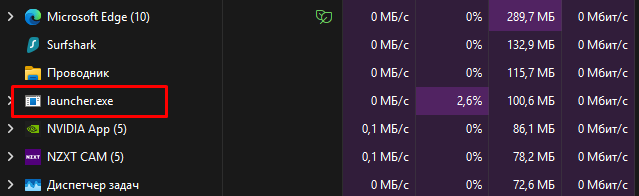
No response from the loader / Loader disappears from Task Manager after 3–4 seconds. First, identify the problem:
- The
launcher.exeprocess disappears from Task Manager after 3–4 seconds. - The
launcher.exeprocess gets stuck in Task Manager; the loader does not open.
Security warning: VPN use and firewall changes can affect privacy and system security. Use trusted software. Avoid permanently disabling firewall protection; prefer allowing only trusted applications through Windows Firewall, then restore protection after testing.
#Process disappears from Task Manager after 3–4 seconds
- Restart your PC and try again. In rare cases, a simple reboot fixes the issue.
- Install the latest DirectX libraries: Download DirectX
- Use a trusted VPN before launching the loader.
- If firewall blocking is suspected, follow firewall troubleshooting instructions and use the least-disruptive option available.
#Process is stuck in Task Manager for an extended period
- If the process appears frozen in Task Manager, leave it for 5–10 minutes. This is normal and is usually caused by slow file downloads from the server.
- To speed up the download process, use a trusted VPN or follow the video instruction for switching the server.
- If firewall blocking is suspected, follow firewall troubleshooting instructions and use the least-disruptive option available.
Sometimes starting diagnostic mode also takes time. Do not close or restart the loader—each restart interrupts the loading process and starts it over.